How to crop and straighten hundreds of sports photos at once
After the cull, every kept photo still needs a crop on the action and a level horizon. How to crop and straighten a whole match of sports photos in bulk, and still control each one.
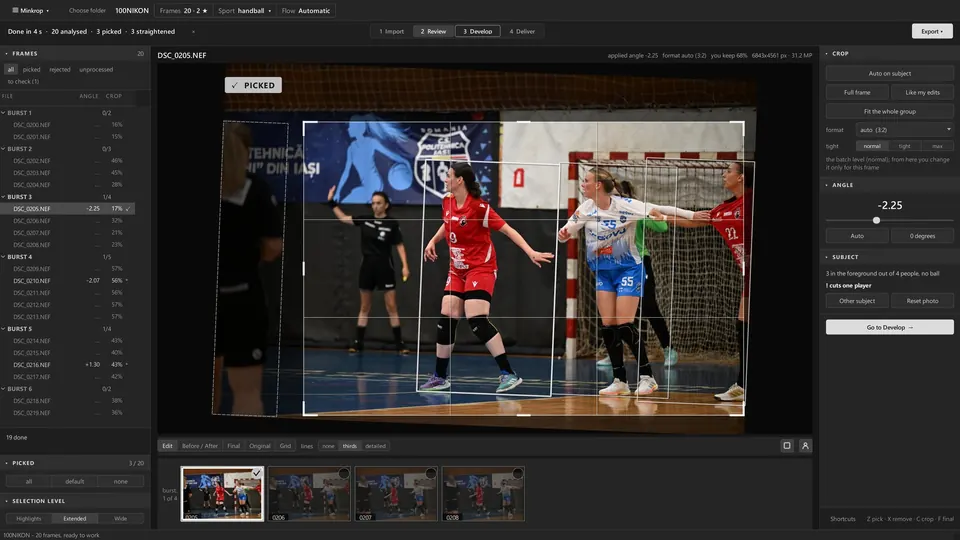
The cull is done and 300 photos are left. Each of them still needs the same two things before it goes to the client: a crop that puts the action where the eye goes, and a horizon that is level. Done by hand in Lightroom, that is a few seconds per photo, hundreds of times over. It is also the part that took us the longest after every match.
What a good sports crop does
- It keeps the players whole. Heads, hands and feet inside the frame; a ball cut in half reads as a mistake.
- It puts the action on the thirds, with room in front of the player, in the direction of the play.
- It keeps one set of formats per delivery, so the gallery looks like one set. Pick the formats your client uses, for example 3:2 or 5:4 landscape and 2:3 or 4:5 portrait.
Straighten only what you keep
A tilt of one or two degrees is enough to make a pitch look like it slopes. The lines to trust are the ones that are really vertical or horizontal in the scene: goal posts, the edge of the pitch, the stands, the players' bodies.
Straightening takes time, so do it only on the photos you keep, never on the whole card.
Doing it in bulk without losing control
Minkrop does both on every kept photo in one pass: it crops on the subject, on the thirds, and straightens it. Then you go through the match and fix only what you would do differently:
- Move or resize the crop on any photo; the last word is yours.
- Choose how tight the crop is for the whole match: Normal, Tight or Maximum.
- Compare the original and the result side by side before you deliver.
Your originals are never touched: everything Minkrop makes is a new file. You export finished JPEGs, or send the photos to Lightroom with the crop and angle ready.
How long it takes
On a real match we measured the whole delivery: 2,000 RAW photos on the card, 400 delivered, culled, cropped, straightened, with a preset and exported as 2048 px JPEGs, in about 15 minutes (Windows PC, Ryzen 7 7800X3D, RTX 3060). That does not count the time you spend looking; yours may differ, and the app has a speed test for your own photos.
Before this step comes the cull: how to cull sports photos fast.
Minkrop is free on Windows and Mac. See how it works.