From card to client.
Minkrop culls, crops and straightens your match photos, then sends them to Lightroom. You decide; it does the desk work.
Launch: 16 October 2026, 12:00 Romania time. The first 100 paying customers get 30% off.
Windows 10/11 & macOS · 9 languages · Lightroom export
 DSC_0205
 DSC_0200
 DSC_0203
 DSC_0206
 DSC_0208
 DSC_0216
Four steps, from card to Lightroom.
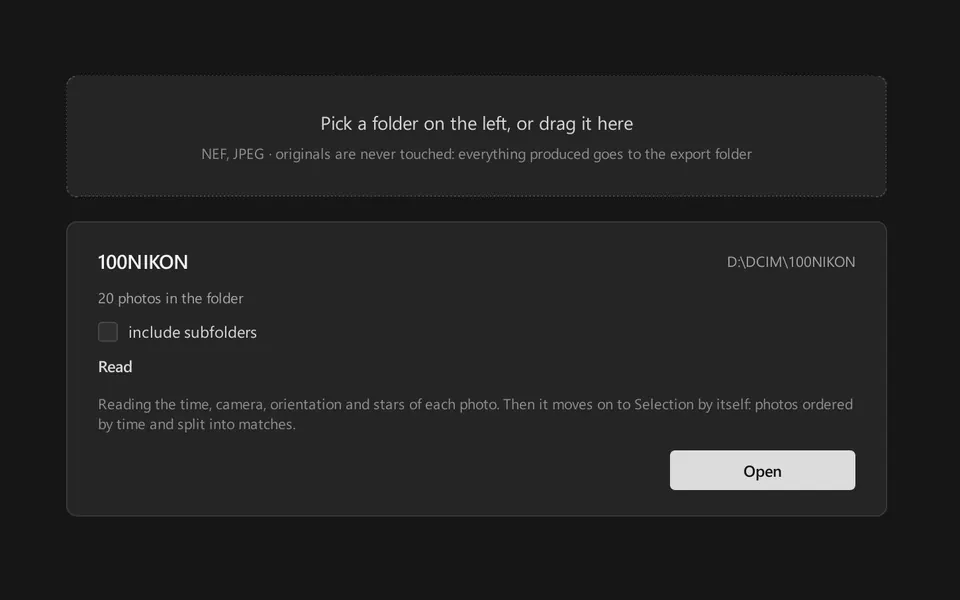
Open the folder from the card
Minkrop reads the photos and groups them into bursts. Nothing is moved or copied yet.
20 frames · 6 bursts
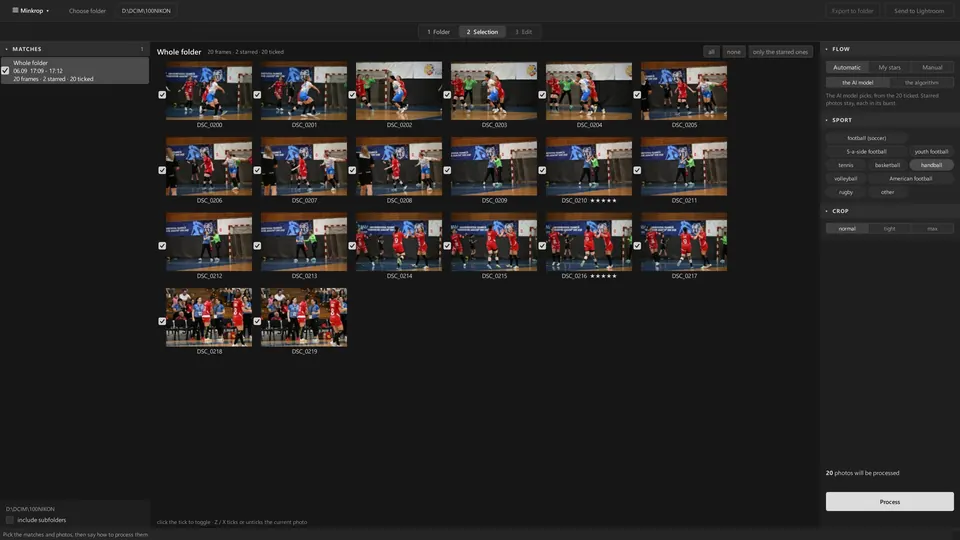
Choose how it selects
Automatic, My stars or Manual. Minkrop proposes the frames worth keeping from each burst; you decide which stay.
20 analysed · 7 picked · 13 not picked
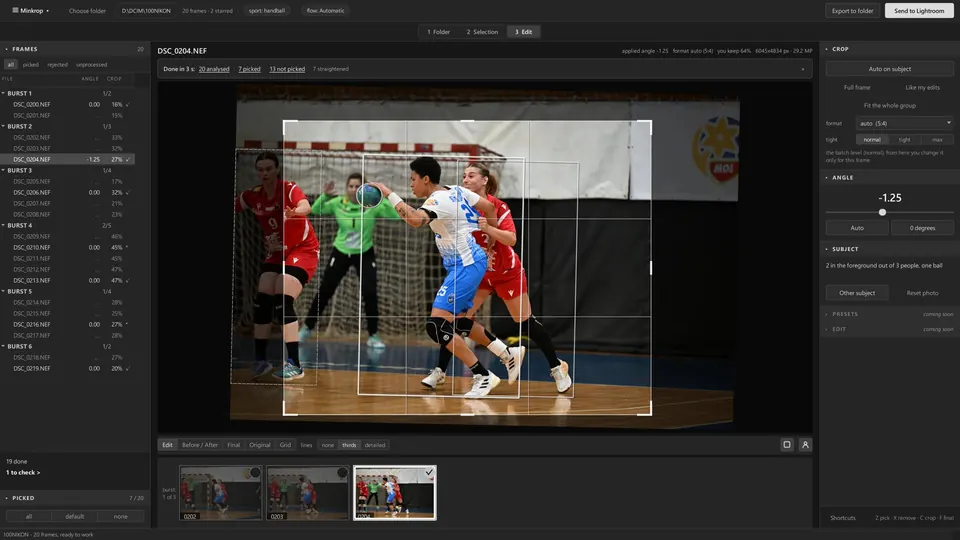
Crop and straighten
The crop follows the action on a rule-of-thirds grid and the horizon is levelled. Every angle and every crop can be changed.
DSC_0204.NEF · angle −1.25
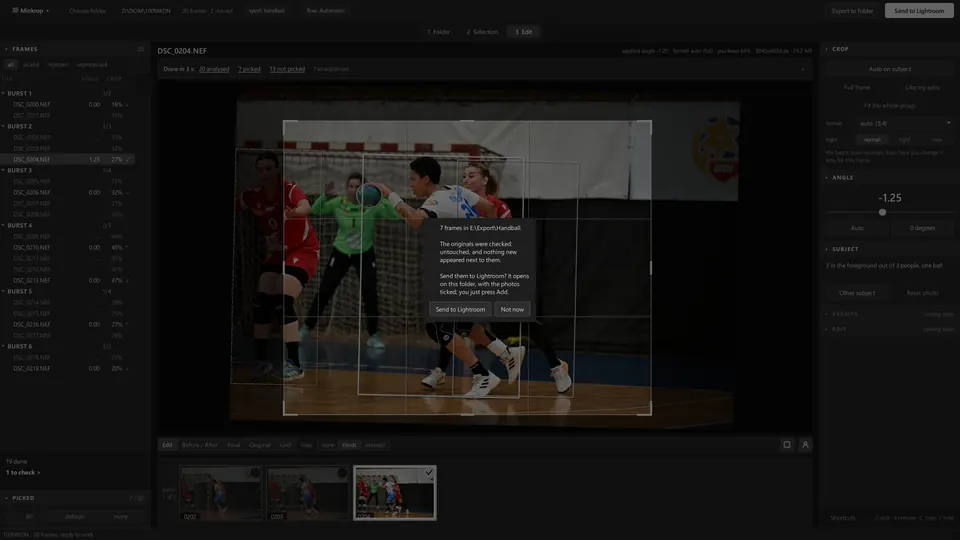
Send it to Lightroom
Export the picked RAW files with an .xmp next to each, or cropped JPEGs, then open them in Lightroom with one button.
7 frames sent to Lightroom
Crooked in. Level out.
Women's handball, seniors, Nikon Z 8. The angle and the crop are what the app proposed; the photos are only rotated and cropped.

Angle −2.25° · 3:2 · keeps 68% of the frame
Measured, not promised.
- 2,000 NEF analysed, framed and straightened
- 1 min 47 sgraphics card, no AI · 3 min 11 s on the processor alone
- 1,000 NEF culled
- 47 sgraphics card
- Straightening 2,000 photos
- 28 sgraphics card
- One picked photo, AI on: the edit is ready in
- 0.16 sgraphics card · 0.62 s on the processor alone
Measured by Minkrop on one Windows PC (Ryzen 7 7800X3D, RTX 3060), Nikon Z 8 NEF files (41 MP) from the internal drive. Yours will differ: Settings › Speed measures it on your own photos.
Your photos stay yours.
Originals are never touched
Minkrop writes new files to an export folder. Your RAW files stay exactly as they are.
Nothing leaves your computer
Everything runs locally, the AI included. No photo is uploaded anywhere.
Works with Lightroom
RAW files with an .xmp next to each (the angle and the crop) or cropped JPEGs. Nothing new to learn.
The AI only helps
It proposes frames and the crop. You choose, and you can change anything.
Windows 10/11 and macOS
Interface in 9 languages. 15-day trial, no card.

Built by a sports photographer.
Silviu Butnarașu has taken 1.4 million photos in 2 years, across several sports: football, minifootball, handball, basketball, volleyball. Minkrop does what he did by hand after every match, in the same order, only faster.
Read the full storyWhere it goes from here.
Now2.1
Culling, crop, straightening and export to Lightroom.
NextEdit + Presets
Final edited JPEG export, straight from Minkrop.
LaterCloud
A cloud gallery, to deliver to clients faster.
New features from the roadmap join your subscription. See the full roadmap →
Pick your plan
Prices for: USA
Monthly
$20
excl. VAT / sales tax · added at checkout
Regular price: $29
Launch price · first 100 paying customers
Billed monthly
Join the waitlistSeason
$97
excl. VAT / sales tax · added at checkout
Regular price: $139
Launch price · first 100 paying customers
6 months · one payment, renews every 6 months
Join the waitlistAnnual
$160
excl. VAT / sales tax · added at checkout
Regular price: $229
Launch price · first 100 paying customers
12 months · one payment, renews yearly · $13.33/mo
Join the waitlistLaunch offer: the prices above are already 30% off, for the first 100 paying customers. After that, the regular prices apply.
Prices exclude VAT and sales tax: checkout adds the tax for your country.
15-day free trial: the full tool, no card.
Start your free trialLaunching 16 October.
Available now
DownloadWaitlist
Questions, answered
Does it work on Mac and Windows?
Yes. Minkrop runs on Windows 10 and 11 and on macOS.
How does the Lightroom export work?
When processing is done, you export: Minkrop copies the picked RAW files with an .xmp file next to each (the angle and the crop), or writes cropped JPEGs. Send to Lightroom then opens them in Adobe Lightroom. Your originals are never touched.
Do my photos leave my computer?
No. Everything runs on your computer, the AI included; no photo goes anywhere.
Is there a free trial?
Yes: 15 days with the full tool, no card needed.
How fast is it on my computer?
Minkrop measures it for you: Settings › Speed processes 48 of your photos and projects the time for 1,000. On an NVIDIA GeForce RTX 3060: 1.3 min per 1,000 photos, plus 1.0 min with AI culling.

Spend your time shooting, not cropping.
Join the waitlistWindows 10/11 & macOS · 9 languages · Lightroom export